The GPU That Didn't Know What It Could Do: From 5 to 13 Tokens/Second Without Buying Anything
I spent an evening discovering that the GPU in my mini-PC had speed reserves it wasn't using. That a benchmark I ran poorly gave me the wrong verdict. And that in the end, home AI runs twice as fast without spending a single euro. Here's how it went.
Note: the “from 5 to 13” in the title is today's journey—the model I used before ran at 5 tokens/second, the one I use now at 13. I focused on optimization starting from a fair comparison, same model with different backends; that's all in the table below.
Before we begin: I'm not a programmer and have no technical background. Everything I do—configure servers, compile code, manage backends—I do working side by side with AI assistants. I don't copy instructions at random: I follow logic, ask for explanations, try and retry. This post isn't testimony from a specialist. It's the account of someone who learned to navigate technical territories with a digital co-pilot.
First Things First: Tokens
When an AI writes, it doesn't produce whole words but tokens: pieces of words, of variable length. “Tokens per second” (t/s) is therefore the speed at which the model generates the response: at 5 t/s the answer arrives at a snail's pace, at 13 t/s it feels like someone typing quickly.
But there's the other side, the less visible one. Before answering, the model must read what you wrote, and reading also has its own speed (prompt processing, incoming tokens). If the model reads slowly, the wait in front of the pulsing cursor stretches. In my case, delays of several seconds happened before it even started responding.
My problem was generation: five tokens per second on the model I use every day. Annoying.
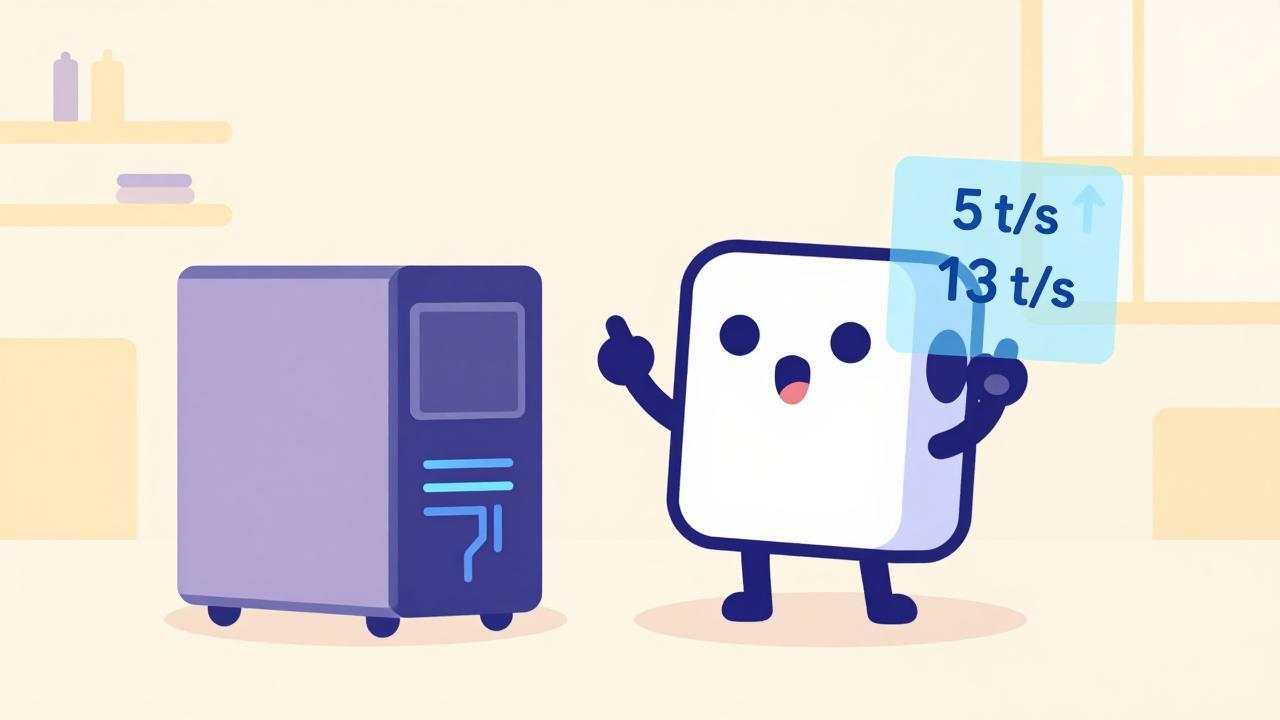
The starting point: 5 tokens per second on the model I used daily. Slow, annoying, and with a GPU that didn't yet know what it could do.
The Mystery of the GPU
Five tokens per second is low, but the right question to ask to figure out how to speed things up is: where is the calculation performed to determine which token to return? An AI generates tokens one at a time, and each token is the result of a chain of multiplications on huge numbers. Someone has to do those calculations: the CPU or the GPU? And if it's the GPU, does it actually do them, or just hold the model in memory?
My first hypothesis, the obvious one: “it's probably running on the CPU, poor GPU.” I check Ollama logs and the answer is no. The integrated Arc GPU in my mini-PC had been detected, and the mistral-nemo:12b model had been loaded entirely onto it. The GPU was working. It was just slow.
And from here on, the evening degenerates—in the good way.
The Backend Is a Translator
A GPU doesn't understand AI models directly: you need a piece of software that takes the model's calculations and translates them into instructions the GPU can execute. This translator is called a backend.
In my configuration, Ollama—the program that manages my models—uses a backend called Vulkan with Intel GPUs: a generic translator that speaks the GPU's common language.
The thing is, recent Intel Arc GPUs contain, on paper, specialized units called XMX, designed to multiply matrices—which is literally AI's job. Running a model without using them is like having a professional oven in your kitchen and cooking with a microwave. In my case, with Vulkan, that gain wasn't coming through.
There's another backend, however: SYCL—an open standard from the Khronos Group, with implementations for Intel GPUs based on oneAPI, Intel's own library—that theoretically exploits those units. Worth checking.
(I also considered LM Studio as an alternative. Then I realized that, as far as I know, under the hood it also uses Vulkan: changing the box doesn't change the engine.)
The Benchmark I Ran Wrong
I install the oneAPI toolkit, compile llama.cpp with the SYCL backend, run the first benchmark: 5.97 t/s. About 0.7 tokens more than before. A gain that didn't justify the effort of compilation and configuration. Rash verdict: “SYCL isn't worth it.”
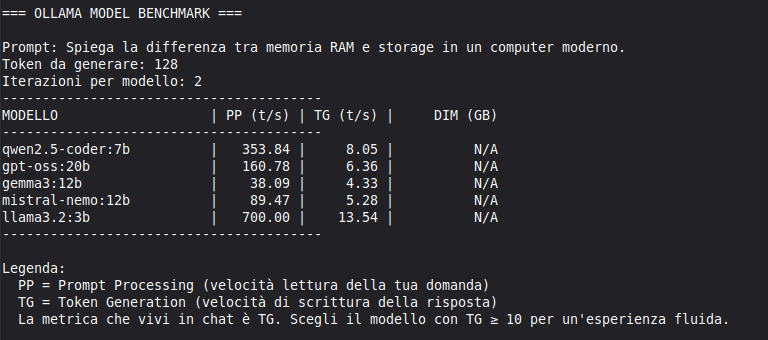
Too bad the benchmark was wrong: while measuring, Ollama was still running with its models loaded in GPU, competing for memory and bandwidth. It was like measuring a car's performance while giving a ride to an elephant in the passenger seat. And the fingerprint was right there in the numbers: the measurement fluctuated by ± 2 t/s from one run to the next—an instability that wasn't there with a free GPU.
If you want to measure correctly, turn off everything you're not measuring.
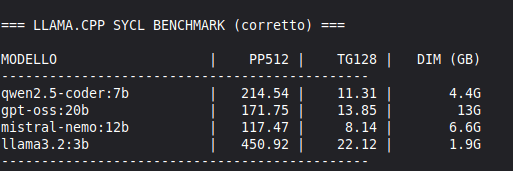
So here's the speed measured again, with a free GPU:
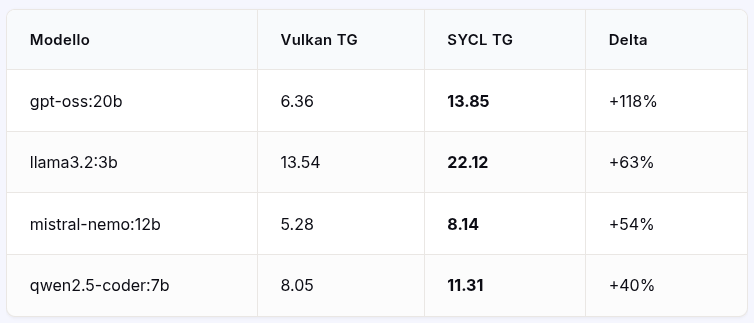
As much as I could, I kept everything the same: same GGUF file (which contains the model), same GPU, same input length. The real difference lies in the backend. Methodology: same prompt and 128 tokens generated per iteration, two iterations per model from both sides; SYCL measured with llama-bench (two consistent executions), Vulkan via Ollama's API. Gains from +40% to +118%.
But the table only counts writing. On prompt reading, the ranking flips: Vulkan stays ahead—the smallest model, for instance, is read at 700 t/s versus 451 t/s with SYCL. The trade-off, concretely: SYCL wins in generation, loses a few initial seconds when the context is huge. In my daily use, made of short questions, the first count is what matters.

The fair benchmark: same GPU, same model file, different backend. The verdict was already written in the first, unstable measurement: the elephant was sitting right there.
Setting It Up: Three Incidents and Three Fixes
Getting it into production wasn't immediately smooth. Three episodes, three fixes.
The systemd service managing services on Linux wouldn't start anything: at runtime libdnnl.so.3 was missing—the Intel libraries sit in folders (/opt/intel/oneapi/...) that systemd doesn't look at. Fix: a startup script that loads the oneAPI environment and then launches the server.
Then the default port was already occupied by another service on the mini-PC (Sentinelle di Casa). Moved everything to 8090.
Finally, the chat responded nonsense, monologues in English out of context. The problem was the chat template, the script that tells the model how a conversation works. Ollama keeps it archived separately, outside the model file, and passes it when needed. The new server took the file on the fly, bare and without a script: hence the monologues. Fix: an explicit flag, --chat-template gpt-oss, which hands it over.
How It's Configured Now
Interface unchanged (Open WebUI, with Ollama as the default at boot and the SYCL server turned on-demand, switching connections), models shared on disk between the two services to change the backend without duplicating files.
What I Learned
First: turn everything off before measuring something. The verdict that almost made me give up was my methodology's fault, not the technology's.
Second: the margin for improvement lay in the backend, not the box. The leap was made by the translator, not the program containing it.
Third: my iGPU Arc had unused capacity, not because it was idle, but because the standard tool didn't use it. Reading how your own GPU really works costs an evening of compilation—less than a new component.
Moral
Moral of the evening: sometimes a slow GPU doesn't need new hardware, just someone who speaks to it the right way. On my end, my mini-PC talks at twice yesterday's speed, and I didn't have to buy anything. I only paid in millions of conversation tokens with an AI assistant, but I already had plenty of those.
“Free technology isn't just code — it's the freedom to look under the hood.”
👤 Lorenzo | ItsMeLarry all about me here
🧪 AI & Open Source Experiments | 🕹️ Retro Gaming & Graphic Novels 🎸 Rock, Folk, Jazz, Punk | 🔒 Privacy First 📍 Tuscany / Digital